If you decide to cancel your account, please read the following carefully before proceeding to protect your legitimate rights and interests.
The account you apply to cancel should be the account registered and used by yourself according to the "Service Agreement". Please ensure that you have the right to decide to cancel the account and will not infringe on the legitimate rights and interests of any third party. If any complaints or disputes arise as a result, you will be responsible for it yourself, and the platform will not be responsible for it.
Account cancellation is an irreversible operation. Please confirm that all services related to the account have been properly handled before proceeding.
Unless otherwise provided by laws and regulations, account cancellation will be deemed as your waiver of the account and its related rights, including but not limited to:
- After the account is cancelled, the account will be permanently cancelled and cannot be logged in again.
- You will no longer be able to use the account, and you will not be able to retrieve any information and benefits in the account, including but not limited to personal identity information, account info, historical records, etc.
Before applying for account cancellation, you should ensure that the account is in normal condition, including:
- There have been no sensitive operations such as changing passwords or binding information in the past month, and there is no risk of account theft, suspension, or freezing.
- There have been no disputes in the past three months, including but not limited to complaints or reports.
- There are no outstanding contractual relationships or other rights and obligations arising or maintained based on the existence of the account, and no disputes arising from account cancellation.
- Terminated authorized login or binding relationships with other third-party websites and applications.
You promise that once you submit an account cancellation application, you will not request the cancellation of the application for any reason.
After the account is cancelled, we will process the personal information related to the account in accordance with relevant laws and regulations, the Service Agreement and the Privacy Policy, including but not limited to deletion, anonymization or retention for a specific period of time in accordance with the agreement or legal provisions.
During the account cancellation period, if the account is complained about by others, investigated by national authorities, or in litigation or arbitration proceedings, the platform has the right to unilaterally terminate the account cancellation process without your consent.
Please note that account cancellation will be deemed as your unilateral termination of the "Terms of Service" and related platform agreements/rules. Therefore, after you click "Confirm Cancellation" to submit the account cancellation application, the platform will terminate the service for the account without any responsibility. At the same time, account cancellation does not mean exemption or reduction of the behavior and related responsibilities before the account cancellation.
If you encounter any problems or difficulties during the cancellation process, you can click "Feedback" on the client side, fill out and submit an account cancellation application, and our customer service staff will handle it manually. Generally, we will reply within 15 days after verifying your identity. Please note that submitting an account cancellation application through the above method is deemed that you have read and agreed to the relevant provisions of this cancellation notice.
To cancel your account, please follow these steps:
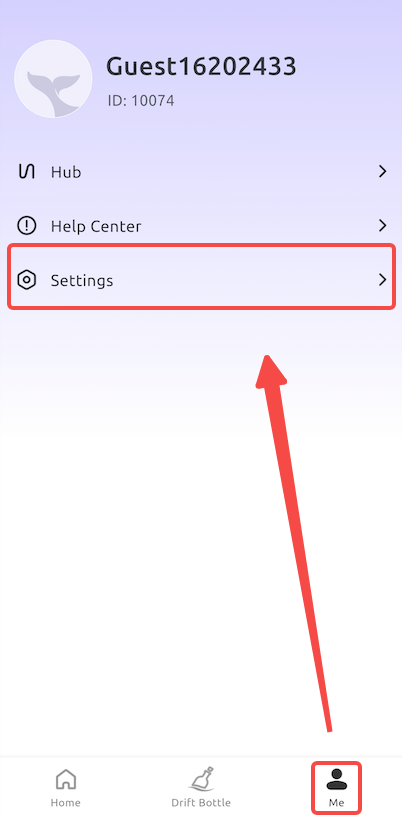
1. Open Client, go to "My" page, and click "Settings" page.
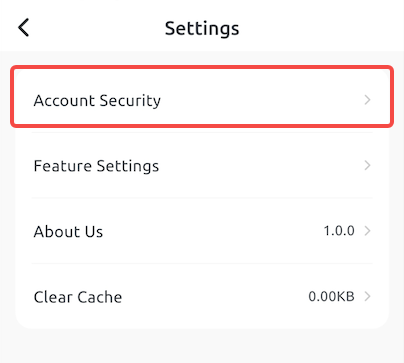
2. Continue clicking "Account Management".
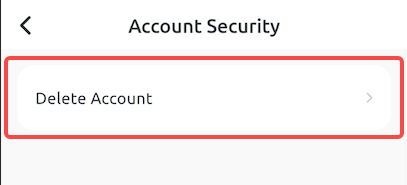
3. Continue clicking "Delete Account".
4. Fill in "Account Cancellation" when describing the reason, and click "Delete Now".
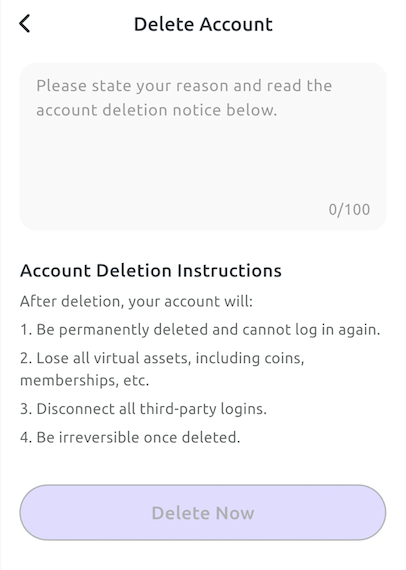
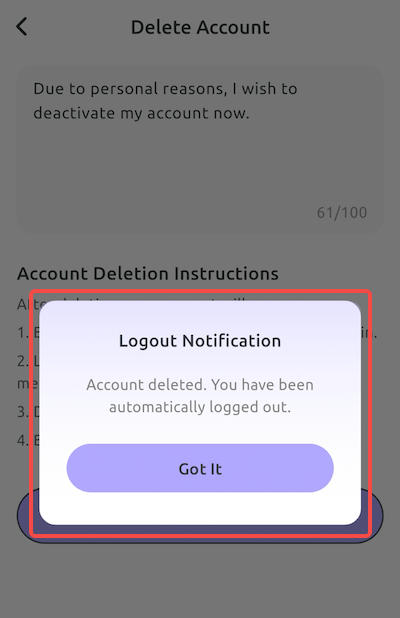
5. The system will successfully delete your account after verification is completed